You have not yet added any article to your bookmarks!
Join 10k+ people to get notified about new posts, news and tips.
Do not worry we don't spam!
Post by : Anis Farhan
With the holiday season approaching, Apple is preparing to deliver a significant update to its iPhone operating system. The upcoming iOS 26.2 is shaping up to be more than a minor maintenance release — the update packs a range of refinements, user-focused tweaks, and behind-the-scenes optimizations designed to smooth out rough edges and improve overall device experience. As the company rolls out its second point update since the major redesign with iOS 26, many iPhone users are watching closely to see what changes might sway them to finally upgrade.
In this article, we examine iOS 26.2 in detail — its expected release date, new features and enhancements, how it builds on iOS 26, which devices will get it, and what users should keep in mind before hitting “Update.”
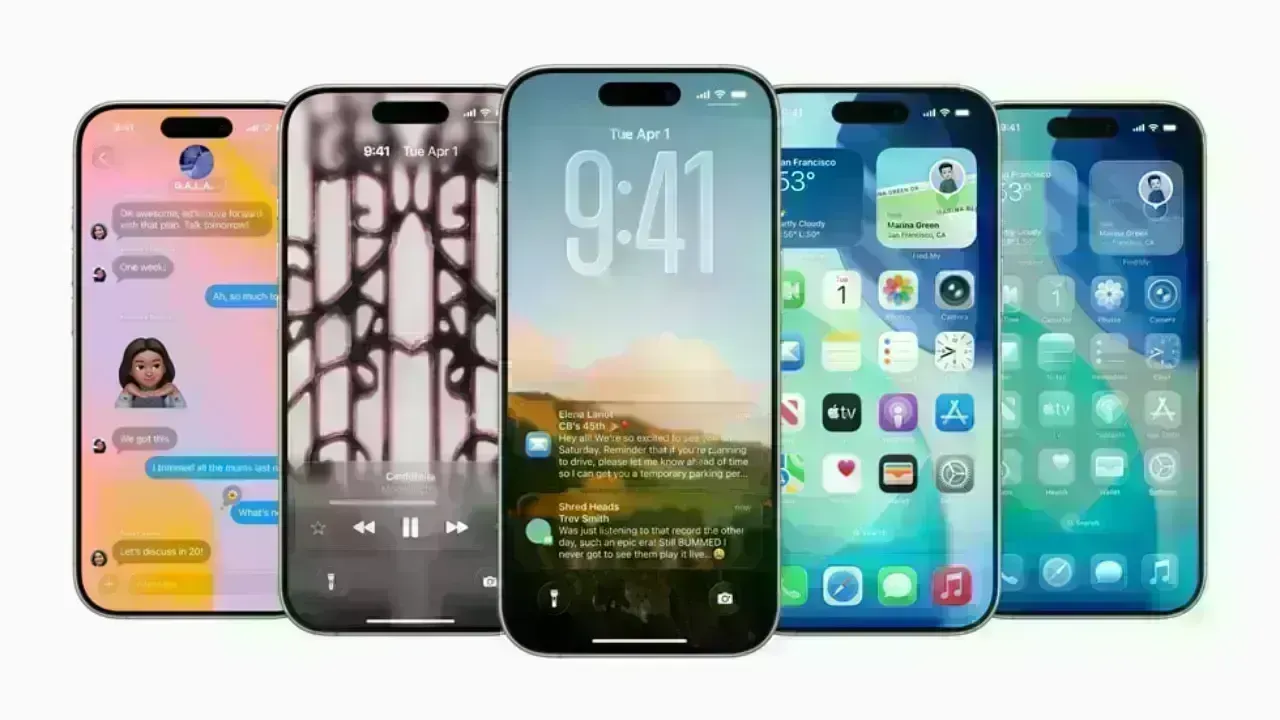
iOS 26.2 serves as a follow-up to iOS 26, which itself represented a major shift — a redesign with a new visual style dubbed “Liquid Glass,” enhanced privacy controls, improved messaging features, and more.
However, big OS updates often introduce bugs, performance slowdowns, or unexpected user complaints — and iOS 26 was no exception. What iOS 26.2 aims to do is refine that foundation. By rolling out bug fixes, improving stability, polishing animations, and adding practical new features, Apple appears to be delivering the version of iOS 26 that many users were waiting for. For those on older versions (like iOS 18 or earlier), this update could mark a more stable and feature-complete reason to finally upgrade.
Because the update isn’t just about flashy new bells and whistles — it's also about ensuring reliability, security, and smoother daily use — it holds importance not only for early adopters, but for any iPhone user seeking a stable, balanced experience.
Apple has already seeded the second Release Candidate (RC) of iOS 26.2 to developers and public beta testers, which strongly signals that the public release is imminent.
Based on Apple’s typical release patterns — and recent reporting — the update is expected to go live between December 9 and December 11, 2025. For users in India, the rollout may begin around 10:30 PM IST, aligning with global release timing norms.
While some earlier predictions speculated a possible mid-December release (even around the 15th or 16th), the latest development — the RC2 release — makes the early December window much more likely.
In short: if you’re running a modern iPhone model and waiting for the update — keep an eye on the Software Update screen. It’s likely to pop up in a matter of days.
Although iOS 26.2 isn’t a radical overhaul, it brings a number of thoughtful improvements and refinements. According to official release notes and recent beta testing coverage, here are the most noteworthy changes coming with this update:
One of the most useful additions: you can now mark any reminder as “Urgent.” Once the time arrives, the iPhone will play a full alarm — not just a notification badge — ensuring you’re less likely to miss important tasks. This is especially helpful for critical reminders when Focus modes or Do Not Disturb are active.
iOS 26 introduced the Liquid Glass design — a more fluid, glass-like UI for the lock screen, home screen, and app menus. With iOS 26.2, Apple is fine-tuning that experience. For instance, a new slider lets you adjust the transparency of the clock on the Lock Screen, offering more control over how subtle or bold the effect should be.
Context menus and animations have also been polished: menus grow and shrink smoothly, interactions feel snappier, and overall visual transitions are more fluid and less jarring.
Even built-in apps like the Measure tool have been updated to adopt the Liquid Glass aesthetic, giving a consistent look and feel across core functionalities.
For users who often share files with people not in their contacts, iOS 26.2 introduces the option to generate a one-time AirDrop code. That code can be used by someone else to accept a file, without needing to add them to contacts. This improves convenience while preserving privacy.
iOS 26 already offered translation features in Messages, FaceTime, and Phone. With 26.2, Apple is expanding support for live translation via AirPods in more regions — especially broadening availability across the European Union. This makes real-time translation more accessible for travel, work, or cross-language calls.
For users relying on sleep tracking features (on iPhone or Apple Watch), iOS 26.2 recalibrates sleep-score thresholds. The grading scale has been adjusted to better reflect real-world sleep patterns, making the results more realistic and useful. In addition, the Health app updates aim to deliver more accurate metrics and clearer feedback.
While not flashy, these under-the-hood improvements are arguably among the most important. The release candidate rollout disclosed performance enhancements — faster app launches, smoother animations, snappier UI transitions — and reports indicate battery usage has become more efficient under everyday workloads.
For many users, this may translate to a day-to-day experience that feels more reliable, responsive, and energy-efficient.
Several built-in apps have also benefitted from 26.2 updates:
The Podcasts app now supports automatic chapter generation when an episode lacks chapters, and clickable links to other mentioned shows for easier navigation.
The News app and other system apps receive subtle UI tweaks and performance optimizations.
Freeform (Apple’s whiteboard/collaboration app) welcomes functional improvements.
CarPlay now offers an option to disable pinned messages in Messages — a useful feature for those who prefer focus while driving.
As with any major iOS update, not all iPhones remain supported. iOS 26 dropped support for certain older models — specifically those with an A12 Bionic chip (like iPhone XS, XS Max, and XR).
If your iPhone is on a supported list and you’re preparing to update, consider the following steps to ensure a smooth installation:
Back up your device via iCloud or your Mac/PC. This safeguards personal data in case anything goes awry.
Ensure enough storage space. OS updates often require free space — clearing unneeded media or apps can avoid hiccups.
Update critical apps after the OS upgrade, as some may receive patches to work properly with the new system.
If you use accessories or special peripherals (e.g. older Bluetooth devices, CarPlay, external drives), check compatibility once the update installs.
Taking these precautions helps minimize risks and ensures that you take full advantage of the new features and improvements iOS 26.2 brings.
iOS 26.2 isn’t about dramatic changes or flashy headline features; instead, it delivers a balanced mix of stability, usability, and refinement. For many users, especially those who avoided iOS 26 on release due to early bugs or performance complaints, 26.2 may represent the version they’ve waited for — the stable, polished, full-featured experience Apple intended.
Features like Reminder alarms, improved AirDrop sharing, and translation via AirPods are not gimmicks — they address everyday needs and make iPhones genuinely more useful. For someone with a busy schedule, frequent travel, or day-to-day multitasking, these enhancements improve convenience meaningfully.
The Liquid Glass design was controversial when first introduced: some users loved it, others found it too radical or unstable. The refinements in 26.2 — smoother animations, adjustable transparency, better context menus — likely make the design more universally acceptable. Paired with performance and battery improvements, the update aims to deliver a refined and reliable iPhone experience.
With expanded translation support, improved privacy controls, and refined system stability, iOS 26.2 reflects Apple’s continued emphasis on privacy, accessibility, and global usability. The improved features help make iPhones more inclusive and adaptable across different languages, regions, and user needs.
While iOS 26.2 brings many welcomed improvements, it’s not without limitations. Some of the previously highlighted missing features from iOS 26 — like a major Siri overhaul, advanced AI integrations, or deeper systemic changes — remain absent, at least for now. Observers expect such changes to appear in future updates (possibly in iOS 27 or beyond).
Moreover, as with any update, a small share of users may run into compatibility issues, especially with third-party apps or older accessories. Even though Apple works to smooth out most bugs before public release, the diversity of hardware and usage patterns means minor glitches can surface post-launch.
iOS 26.2 may not be the most hyped update in Apple’s history — but it just might be one of the most practical and thoughtfully put-together ones in recent times. By combining performance refinements, user-focused enhancements, UI polish, and practical features, it offers a meaningful upgrade for iPhone users seeking stability and usability.
Whether you skipped iOS 26 earlier or are already using it, iOS 26.2 is likely worth your attention. If you own a supported iPhone, back up your device, free up storage, and consider updating once the rollout begins — expected between December 9 and 11, 2025.
For many, this update may well mark the moment when iOS 26 becomes a full-fledged, refined version worth daily use.
This article is written for informational purposes and does not constitute professional advice. Device compatibility and user experience may vary depending on hardware model, settings, and app usage.









Beauden Barrett Opens Up About Mental Struggles During All Blacks Exile
Beauden Barrett discusses his confidence struggles after missing six tests, his return against Austr

IMF Says AI Investment Supports Global Growth Despite Energy Shock
IMF says AI investment is supporting global growth near 3%, with Asian economies benefiting from ris

Will O'Rourke Ruled Out of New Zealand's India Series
New Zealand fast bowler Will O'Rourke will miss the India series with hamstring and calf injuries as
AI Companies Expected to Drive Most US Earnings Growth in Q3
AI companies are expected to drive US third-quarter earnings growth as investors assess tech profits
Money Market Funds See Record Inflows as Global Bond Selloff Intensifies
Global money market funds attract $153.81 billion as bond yields rise, inflation fears persist and i
Meta Bans TikTok Ads on Facebook and Instagram in Seven Countries
Meta has banned TikTok ads in seven countries, escalating competition over social media users, adver